BL-2022-track looper
Join alphaIllustration · no audio
Tap. Beatbox. Tap again.
BL-202 is a two-track live looper for Android phones, built to play like a hardware pedal. Scroll to play the first loop. Your thumb is the transport.
One round key per track
Each track has one round key, and it always does the next thing that track needs: record, play, or stack another layer. The round keys fire the moment your thumb lands. Nothing hides behind a swipe.
Both tracks · Empty

Red means the mic is live
Tap track 1 and beatbox. The key goes solid red with a dot while it records, and on this instrument red means that and nothing else. Your first take can set the tempo, or tap one in first with TAP.
Track 1 · Rec

Tap again and it loops
The take closes and plays straight back in yellow. The ring goes round once per pass, with a white bar where the loop is now, so you always know where the top is.
Track 1 · Play

Track 2 comes in on the one
Tap track 2 mid-phrase. Its display blinks ARMED and counts the beats in, and the take starts on the loop boundary, not where your thumb landed, so the layers line up. Scroll slowly past the boundary line and watch it flip to REC.
Track 2 · Armed

Layers stack on one clock
Yellow and lilac, lit to the same point, because both follow one clock. Tap a playing track to stack another layer on it. UNDO takes the last one off, and holding STOP clears the track.
It is built like a pedal: one visible key per action, sized for a stage, nearly every one firing the moment you touch it, with reliability ahead of features.
2 tracks · 1 clock

Hold it sideways
The app plays in landscape only: a loop key under each thumb, the tempo between them, a level fader on each outer edge.
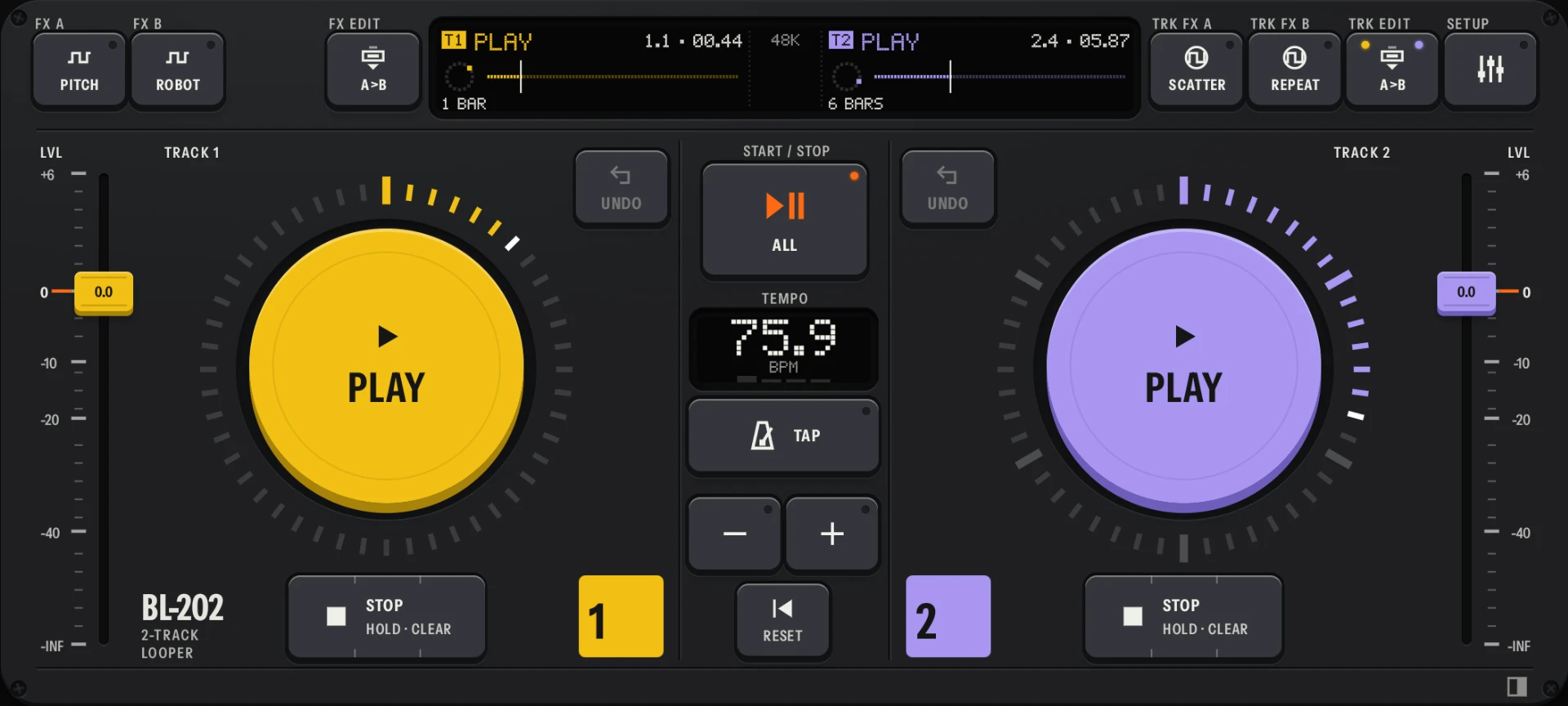 Screenshot
Turn it sideways
- Loop key
- Tap to record, tap again to play, tap a playing track to add a layer.
- Ring
- 48 bars of light, one lap per loop. The bright bar is now.
- Display
- State, time and a picture of each track’s take, sized to read at a glance.
- Stop
- Tap to stop the track. Hold to clear it.
- Undo
- Takes the last layer off.
- Level
- One fader per track, with a detent at 0 dB.
- Tempo
- The session tempo, with a lamp on each beat. TAP sets it by hand.
- All
- Starts or stops both tracks together.
- Input FX
- FX A and FX B each hold an effect for your mic: pitch, robot, filter or lo-fi. FX EDIT opens the panel where you pick and set them.
- Track FX
- TRK FX A and TRK FX B put an effect on the loops of track 1, track 2 or both: the mic effects, plus beat scatter, beat repeat, beat shift and vinyl flick. Tap one to switch it on or off, or hold it to use it only while you hold. TRK EDIT opens their panel.
Specification
- Tracks
- Two, mirrored.
- Per track
- A round loop key to record, overdub and play; STOP, held to clear; UNDO; a level fader.
- Tempo
- A session tempo from the start. TAP sets it by hand, and − and + nudge it.
- Loop settings
- Per track: on the bar grid, free length from tap to tap, or at its own tempo. LENGTH ×2 on the Loop tab doubles a track’s loop.
- Input FX
- Two slots on the mic: pitch, robot, filter and lo-fi.
- Track FX
- Two slots on the loops of track 1, track 2 or both: the mic effects, plus beat scatter, beat repeat, beat shift and vinyl flick.
- Controls
- One visible key per action, built on a 56 × 48 key module, nearly all firing on touch-down. No gesture shortcuts.
- Mic to ears
- Target: Under 20 ms round trip.
- Loop edges
- Target: Pop-free loop boundaries.
- Timing
- Target: Tracks that never drift apart.
- Sessions
- Your loops come back when you reopen the app.
- Screen
- Landscape, full screen.
- Runs on
- Android 8 or newer.
The engine is built to these design targets. Nobody outside development has run this build yet; the alpha is how we measure them.
Your turn on track 1
The Android alpha runs on Discord. Tell us about your phone first, so we know it can keep time.
Before you play
- Need
- Android 8 or newer.
- Need
- Headphones. Wired or USB-C is best; Bluetooth works, with delay.
- Need
- Your phone turned sideways: the app is landscape only.
- Not yet
- More than two tracks.
- Not yet
- Saving loops as files. Your session comes back when you reopen the app, but a loop can’t be exported yet.